
Building PulseDash: Replacing a Dead Wearable's Apps
A friend recently gave me an old wearable, the Pulse Series One. When I tried to use it, I discovered the device had been abandoned and the mobile app was no longer available. It’s a solid fitness band: heart rate, SpO₂, speed, cadence, sleep tracking. The official mobile apps were pulled years ago, and their cloud dashboard just shows a 404 now.
So I had a perfectly good brick that could still stream data over Bluetooth LE but had no way to see it. Naturally, I built my own.
PulseDash is the result: an open-source Flutter app and Go backend that brings the Pulse Series One back to life. Check it out on GitHub.
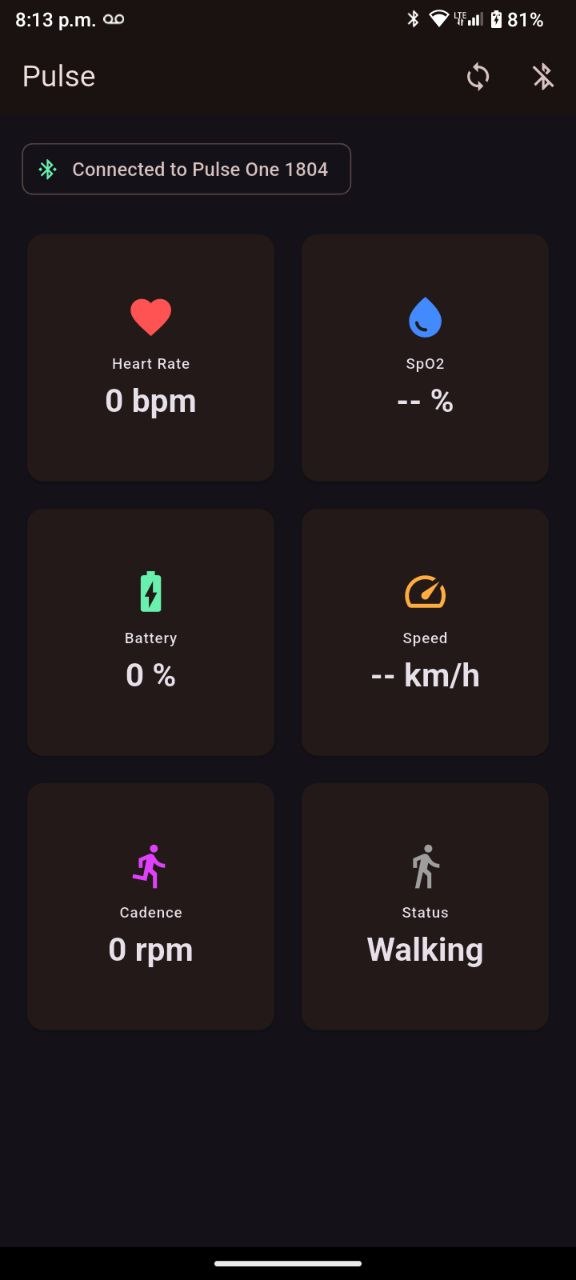
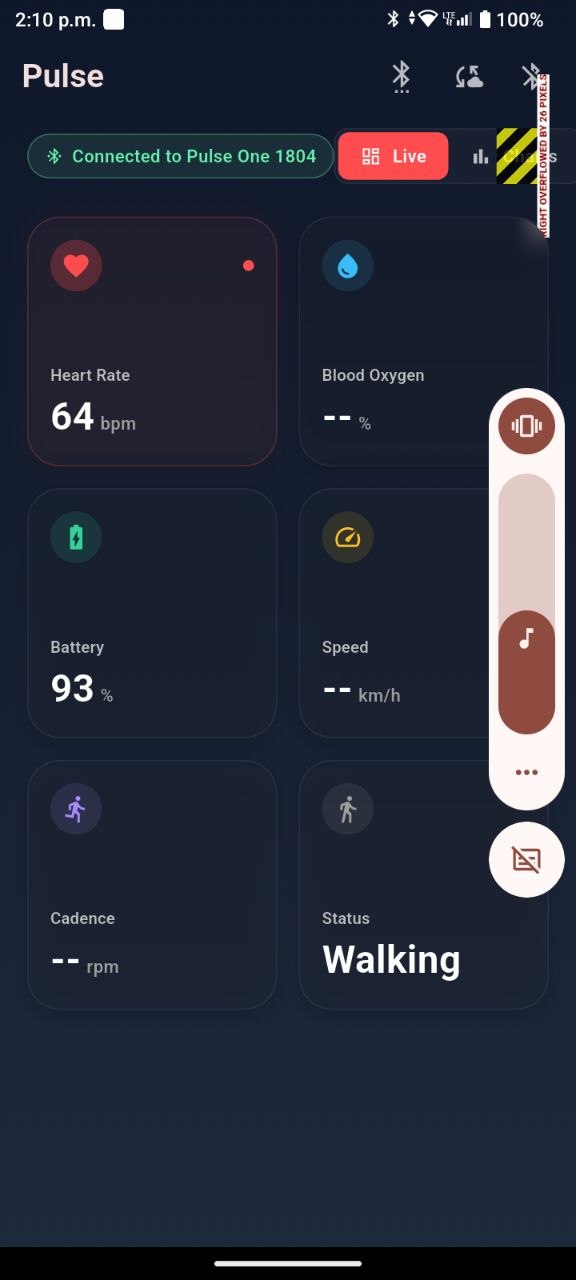
The main dashboard: live metrics from the wearable, no cloud required.
Quick start, if you just want to run the backend and look at the dashboard:
git clone https://github.com/josuebrunel/pulsedash.git
cd pulsedash/backend
docker compose up
# dashboard at http://localhost:8080
The Flutter app needs an Android device and a real Pulse Series One to be useful, but the backend and dashboard run standalone against whatever data you sync into it.
Three Pieces, Two Data Paths
The system has three pieces:
┌──────────────────────────────────────────────┐
│              Android Phone                   │
│  ┌──────────────────────────────────────┐   │
│  │        Flutter App (pulse_dash)       │   │
│  │  ┌────────────────────────────────┐  │   │
│  │  │  Live Dashboard + Charts (UI)  │  │   │
│  │  ├────────────────────────────────┤  │   │
│  │  │  BLE Service (ChangeNotifier)  │  │   │
│  │  │  Sync Service (HTTP)           │  │   │
│  │  ├────────────────────────────────┤  │   │
│  │  │  Parser (BLE characteristic)   │  │   │
│  │  │  LocalDB (SQLite)              │  │   │
│  │  └────────────────────────────────┘  │   │
│  ├──────────────────────────────────────┤   │
│  │      Android Platform (Kotlin)       │   │
│  │  ┌────────────────────────────────┐  │   │
│  │  │  Foreground Service            │  │   │
│  │  │  MethodChannel Bridge          │  │   │
│  │  └────────────────────────────────┘  │   │
│  └──────────────────────────────────────┘   │
│                  │                           │
│           BLE GATT│          HTTP REST       │
│           (live) │          (sync)          │
└──────────────────│──────────────────────────┘
                   │                  │
            ┌──────▼──────┐    ┌──────▼──────────┐
            │ Pulse Series │    │ Go Backend      │
            │ One Wearable │    │ (port 8080)     │
            └──────────────┘    │ ┌────────────┐  │
                                │ │ SQLite DB  │  │
                                │ └────────────┘  │
                                │ ┌────────────┐  │
                                │ │Web Dashboard│  │
                                │ │ (Chart.js)  │  │
                                │ └────────────┘  │
                                └─────────────────┘
Data flows two ways:
- Live path: BLE notifications → parser → UI (real-time cards)
- Storage path: BLE notifications → parser → SQLite → (manual sync) → Go API → server SQLite
Technical Choices
Why Flutter?
I needed BLE support, local persistence, and cross-platform in one shot. Flutter with flutter_blue_plus gave me a single Dart codebase, and platform channels handled the Android foreground service bits. sqflite for SQLite is battle-tested, and fl_chart for charts is pure Dart with zero native baggage.
No state management framework: the app’s simple enough that ChangeNotifier + ListenableBuilder does the job. The BLE service is a single ChangeNotifier that exposes device state and live metrics, and the home screen rebuilds on change notifications. For a single-device, single-screen app, pulling in Riverpod or Bloc would’ve been overkill.
Why Go for the Backend?
The backend is intentionally minimal. Go’s standard library in 1.22+ has http.ServeMux with path-method routing, so I didn’t need any external router:
mux.HandleFunc("POST /api/sync", syncHandler(database))
mux.HandleFunc("GET /api/history", historyHandler(database))
mux.HandleFunc("GET /api/devices", devicesHandler(database))
mux.HandleFunc("GET /", dashboardHandler)
Three endpoints, zero framework dependencies. The binary compiles to a single static executable (~15 MB with SQLite embedded).
Why modernc.org/sqlite?
I wanted zero-dependency deployment: no CGo, no system SQLite library, no database daemon to manage. modernc.org/sqlite is a pure Go translation of SQLite. The whole backend is one go build away from a working binary. For single-user or family use, SQLite handles the load just fine.
Why Templ for the Dashboard?
github.com/a-h/templ compiles HTML templates to Go code at build time, so there’s no runtime template parsing or reflection. The dashboard is a single .templ file with Chart.js and Pico CSS loaded from CDN. It renders server-side and auto-refreshes every 5 seconds:
async function loadData() {
    const resp = await fetch(`/api/history?since=${since}&until=${until}`);
    const data = await resp.json();
    // update Chart.js datasets…
}
setInterval(loadData, 5000);
Sniffing the Protocol
First step was figuring out what data the device actually broadcasts. I fired up a BLE scanner and started taking notes. The Pulse Series One exposes a handful of GATT services, some standard, some custom:
| Characteristic | UUID | Standard | Parsing |
|---|---|---|---|
| Heart Rate Measurement | 00002a37 | GATT HR | 8-bit or 16-bit based on flags byte |
| Battery Level | 00002a19 | GATT Battery | Single byte percentage |
| PLX Continuous SpO₂ | 00002a5f | IEEE-11073 | SFLOAT at offset 1, with NaN/Inf filtering |
| PLX Spot-Check SpO₂ | 00002a5e | IEEE-11073 | Same format, one-shot readings |
| Running Speed & Cadence | 00002a53 | GATT RSC | Speed (1/256 m/s), cadence (RPM), stride flags |
| Custom Vendor (FFF7) | 0000fff7 | Proprietary | Not parseable |
| Custom Vendor (FFF6) | 0000fff6 | Proprietary | Write-only, triggers memory sync |
The first five follow documented Bluetooth SIG specs. The last two are the device’s proprietary channel, and that’s where I hit a wall.
This isn’t a novel problem: projects like Gadgetbridge have been reverse-engineering wearable BLE protocols at scale for years, across dozens of vendors. I didn’t reference their source for the Pulse Series One specifically (it wasn’t in their supported-device list), but the standard-GATT-first, proprietary-vendor-channel-second split described below is exactly the pattern they’ve documented repeatedly.
The First App
The initial Flutter app was straightforward: scan for the device, connect, subscribe to notifications on each characteristic, parse the bytes, and show the numbers on a dark dashboard.
ParsedMetric parseCharacteristic(String charUUID, List<int> buf) {
  switch (charUUID) {
    case hrCharUuid:
      byte0 = buf[0];
      if (byte0 & 0x01 == 0) return ParsedMetric(heartRate: buf[1]);
      return ParsedMetric(heartRate: (buf[1] << 8) | buf[2]);
    case spo2ContinuousCharUuid:
      return ParsedMetric(spO2: _parseSFLOAT(buf, 1));
    // …
  }
}
Within a few hours I had live heart rate and battery on screen. The easy part was over.
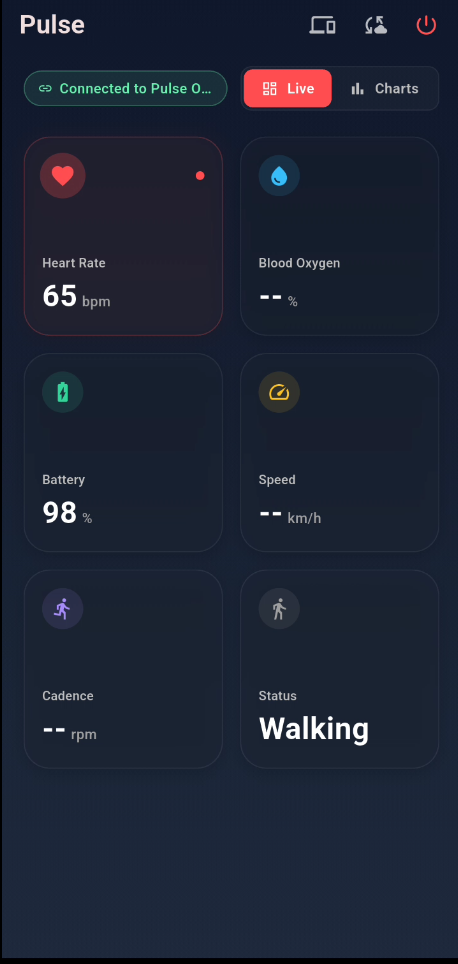
Real-time BLE data streaming into animated metric cards.
The GATT 133 Nightmare
Android’s BLE stack is notoriously flaky across vendors. On my Samsung test device, connections kept failing with GATT_ERROR 133: a transient internal error the Bluetooth stack throws when the controller firmware gets into a bad state.
The fix involved three things:
- Attach the listener before enabling notifications. If you call
setNotifyValuebeforesetNotifiable, the first data packet gets silently dropped. - Remove
requestConnectionPriority()entirely. On Samsung firmware, this triggers GATT 133 every time. - Wrap the whole connect-discover-subscribe sequence in a retry loop (up to 3 attempts) to recover from transient Bluetooth controller bugs.
for (int attempt = 1; attempt <= maxRetries; attempt++) {
  try {
    await remoteDevice.connect();
    await remoteDevice.discoverServices();
    _device = remoteDevice;
    await char.setNotifiable(true);
    char.lastValueStream.listen(_handleData);
    break;
  } on Exception catch (e) {
    logError('Connection attempt $attempt failed: $e');
    await remoteDevice.disconnect();
  }
}
I also added connectionState.skip(1) to ignore the stream’s initial disconnected value, and mounted guards (mounted) on every async setState call to prevent dispose-after-disconnect crashes.
Keeping BLE Alive
When the screen locks, Android kills the app’s CPU time. BLE notifications stop, and you lose data. The fix is a foreground service with a persistent notification and a partial wake lock.
The Android foreground service is written in Kotlin:
override fun onStartCommand(intent: Intent?, flags: Int, startId: Int): Int {
    val notification = NotificationCompat.Builder(this, "pulsedash_ble_channel")
        .setContentTitle("PulseDash")
        .setContentText("Collecting health data from your device")
        .build()
    startForeground(1, notification)
    wakeLock = powerManager.newWakeLock(
        PowerManager.PARTIAL_WAKE_LOCK, "PulseDash:BleWakeLock"
    ).apply { acquire(4 * 60 * 60 * 1000L) }
    return START_STICKY
}
The wake lock has a 4-hour safety timeout: if something goes wrong, the system can reclaim it. START_STICKY means Android restarts the service if it gets killed.
The Flutter bridge communicates via MethodChannel:
static const _channel = MethodChannel('com.pulse.pulsedash/foreground_service');
static Future<void> start() => _channel.invokeMethod('startService');
static Future<void> stop() => _channel.invokeMethod('stopService');
The service starts when BLE connects and stops on disconnect. The app also checks battery optimization status on launch and asks the user to exempt PulseDash.
The SFLOAT Wars
SpO₂ data arrives as IEEE-11073 16-bit SFLOAT values: a compact format with a 4-bit signed exponent and a 12-bit signed mantissa.
value = mantissa × 10^exponent
The spec sounds simple, but the Pulse Series One sends sentinel values: 0x07FF (NaN), 0x07FE (+Infinity), 0x0800 (NRes), 0x0801 (Reserved), 0x0802 (-Infinity), that you have to filter out. And some packets just don’t follow the spec at all.
The initial parser missed several metrics entirely. After adding test fixtures from real device captures, the parser grew fallback heuristics:
double? _parseSFLOAT(List<int> bytes, int offset) {
  if (bytes.length < offset + 2) return null;
  int raw = (bytes[offset + 1] << 8) | bytes[offset];
  if (_isSpecial(raw)) return null;
  int exponent = (raw >> 12) & 0x0F;
  int mantissa = raw & 0x0FFF;
  if (exponent >= 8) exponent -= 16;
  if (mantissa >= 2048) mantissa -= 4096;
  double value = mantissa * _pow10(exponent);
  if (value > 0 && value <= 100) return value;
  return null;
}
If SFLOAT parsing fails, the parser tries reading the raw byte directly (if it falls between 50–100, it’s probably SpO₂). It’s not pretty, but it works. The test suite now covers 18 parser scenarios including every edge case I could capture.
Rename and Production Audit
Halfway through, I realized “Pulse” was way too generic. The rename to PulseDash touched every file: Android package (com.pulse.pulse_app → com.pulse.pulsedash), Dart package (pulse_app → pulse_dash), database filename, notification labels, ProGuard rules, even the MaterialApp title.
The production audit that followed was long overdue:
- Extracted the monolithic
main.dart(954 lines → services, screens, widgets) - Replaced deprecated
withOpacity→withValues(alpha: ...) - Added a structured logger with
debugPrintin debug anddart:developerlog in release - Enabled code quality lints (
prefer_const,avoid_print, etc.) - Added ProGuard rules and enabled minification for release APKs
- Expanded test coverage to 22 tests covering parser edge cases, model serialization, and a widget smoke test
The project structure after the refactor:
mobile/lib/
├── main.dart                     # App entry point
├── db.dart                       # SQLite helper + models
├── parser.dart                   # BLE characteristic parser
├── foreground_service.dart       # MethodChannel bridge
├── screens/
│   ├── home_screen.dart          # Main dashboard (Live + Charts tabs)
│   └── device_manager_screen.dart # Device management + proprietary sync
├── services/
│   ├── ble_service.dart          # BLE connection + notification handling
│   └── sync_service.dart         # HTTP sync to backend
├── widgets/
│   ├── metric_card.dart          # Animated metric display card
│   ├── charts_view.dart          # fl_chart time-series graphs
│   └── scan_sheet.dart           # BLE scan bottom sheet
└── utils/
    ├── logger.dart               # Structured logging
    └── time_format.dart          # Relative time formatting
Data Model
The MetricReading model is shared between the mobile SQLite and the server API:
class MetricReading {
  final String timestamp;   // RFC3339
  final String deviceId;    // BLE MAC address
  final int? heartRate;     // bpm
  final double? spO2;       // percentage
  final int? battery;       // percentage
  final double? speed;      // km/h
  final int? cadence;       // steps/min or RPM
  final bool? running;      // session active
}
The mobile app stores readings with a synced flag (0/1) so unsynced data survives app restarts. Sync pulls all rows where synced = 0, POSTs them as a JSON array, and marks them synced on a 200 response.
The database schema on both sides is essentially the same:
CREATE TABLE metrics (
    id        INTEGER PRIMARY KEY AUTOINCREMENT,
    timestamp TEXT    NOT NULL,
    device_id TEXT    NOT NULL DEFAULT '',
    heart_rate INTEGER NOT NULL DEFAULT 0,
    spo2      REAL    NOT NULL DEFAULT 0,
    battery   INTEGER NOT NULL DEFAULT 0,
    speed     REAL    NOT NULL DEFAULT 0,
    cadence   INTEGER NOT NULL DEFAULT 0,
    running   INTEGER NOT NULL DEFAULT 0
);
The server also has a connected_devices table for nicknames and auto-connect preferences: a mobile-only thing that never syncs to the backend.
Device Manager and Charts
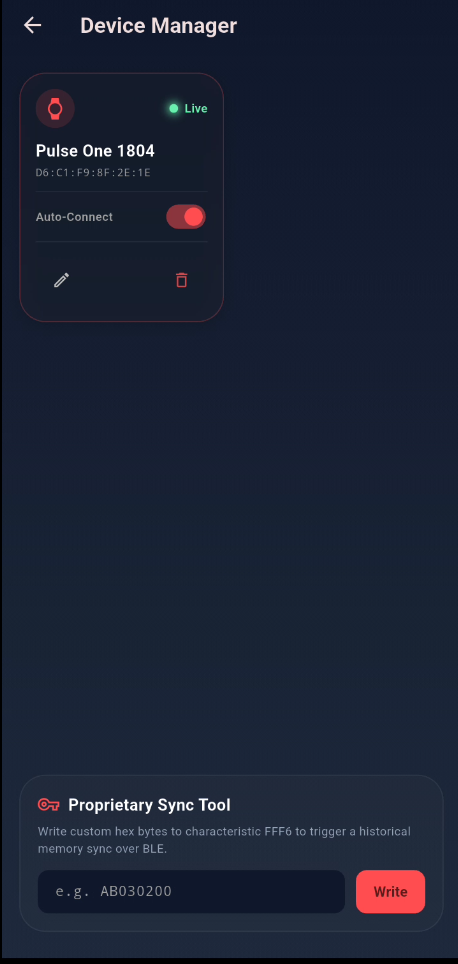
With the foundation solid, I wanted parity with the original app’s historical view. The device manager lets you nickname wearables, toggle auto-connect, and manage multiple devices:
┌──────────────────────────────┐
│  Device Manager              │
│                              │
│  ┌────────────────────────┐  │
│  │ Pulse Series One       │  │
│  │ AA:BB:CC:DD:EE:FF      │  │
│  │ ✓ Auto-connect    LIVE │  │
│  │ [Rename] [Forget]      │  │
│  └────────────────────────┘  │
│                              │
│  ── Proprietary Sync Tool ── │
│  [Hex: ______________] [Go]  │
└──────────────────────────────┘
The charts view uses fl_chart, a pure-Dart charting library, to render time-series lines. It pulls the last 50 readings from local SQLite, plots the most recent 30 for performance, and auto-refreshes every 3 seconds:
Timer.periodic(const Duration(seconds: 3), (_) => _loadReadings());
Session analytics (average, max, min) display below each chart.
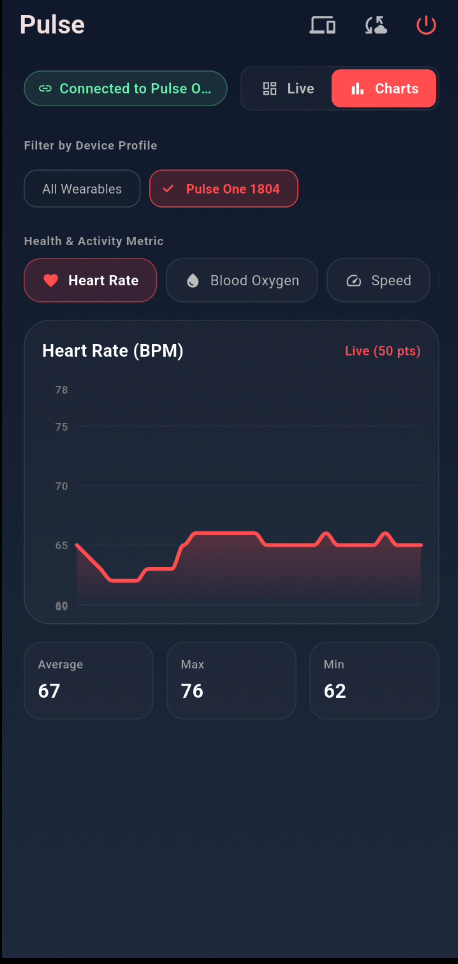
Time-series charts with per-device filtering and auto-refresh.
The Proprietary Sync Tool (And What We Can’t Read)
The device stores historical session data in its internal memory: stuff that accumulated when the app wasn’t connected. Accessing it requires writing a command to the custom FFF6 characteristic, which triggers the device to replay stored data through the FFF7 notification channel.
The proprietary sync tool lets you send raw hex commands to FFF6:
await _bleService.writeCustomHex('AB030200');
The device pushes data back through FFF7, but here’s the rub: that data is encrypted, or uses a proprietary binary format I couldn’t crack. The parser returns an empty ParsedMetric for FFF7 and logs the raw bytes:
[Pulse] Unknown char 0000fff7-... → [0xB3, 0xE8, 0x14, 0xA2, 0x7F, ...]
Without protocol docs from the now-defunct manufacturer, the session memory channel stays opaque. PulseDash currently can’t pull historical memory data. Live streaming metrics work great, but the encrypted session archive on the device is a locked door.
I tried a few approaches:
- Variable-length analysis: Packet sizes vary (5–20 bytes) suggesting structure, not noise.
- Consistent headers: Some packets share the same first byte, hinting at a command-response protocol.
- Without a key or known-plaintext pairs, there’s no way to decrypt the payload.
The proprietary sync panel: gateway to the device’s internal memory, locked behind encryption.
This is the hard limit. If your device has historical memory from before PulseDash, those past sessions are unfortunately unrecoverable through PulseDash.
If you own a Pulse Series One and have captured FFF7 packets, especially any pair where you know what triggered them, open a discussion on the repo. Known-plaintext pairs are exactly what’s missing to make progress on this, and I’d rather crowdsource it than let it sit unsolved.
The Go Backend
The last piece was a self-hosted Go backend. It’s deliberately minimal: standard library HTTP server, pure-Go SQLite, three endpoints. It’s the same “one binary, embedded SQLite, zero runtime dependencies” philosophy I lay out in more detail in My SaaS Tech Stack, here applied to a much smaller project than a SaaS backend.
Server Structure
backend/
├── cmd/pulse/main.go                 # Entry point
├── internal/
│   ├── server/server.go              # Route registration
│   ├── server/handlers.go            # HTTP handlers
│   ├── db/db.go                      # SQLite queries
│   ├── db/models.go                  # MetricReading struct
│   └── dashboard/dashboard.templ     # Web dashboard template
├── Dockerfile
├── docker-compose.yml
├── go.mod
└── Makefile
API Endpoints
| Method | Path | Purpose |
|---|---|---|
POST | /api/sync | Batch-ingest a JSON array of readings |
GET | /api/history | Query readings by time range + optional device ID |
GET | /api/devices | List distinct device MACs with stored data |
GET | / | Render the web dashboard |
The sync handler inserts everything in a single SQLite transaction:
func syncHandler(database *db.DB) http.HandlerFunc {
    return func(w http.ResponseWriter, r *http.Request) {
        var readings []db.MetricReading
        if err := json.NewDecoder(r.Body).Decode(&readings); err != nil {
            http.Error(w, "invalid JSON body", http.StatusBadRequest)
            return
        }
        if err := database.InsertBatch(readings); err != nil {
            log.Printf("sync error: %v", err)
            http.Error(w, "database error", http.StatusInternalServerError)
            return
        }
        json.NewEncoder(w).Encode(map[string]int{"inserted": len(readings)})
    }
}
Deployment
The backend ships as a Docker container. The Dockerfile uses a multi-stage build (Go builder → Alpine runtime) for a ~15 MB image:
FROM golang:1.25-alpine AS builder
WORKDIR /app
COPY go.mod go.sum ./
RUN go mod download
COPY . .
RUN go install github.com/a-h/templ/cmd/templ@latest && \
    templ generate && go build -o pulse ./cmd/pulse/

FROM alpine:3.20
COPY --from=builder /app/pulse .
EXPOSE 8080
CMD ["./pulse"]
The docker-compose.yml maps port 8080 and persists SQLite in a named volume:
services:
  pulse-api:
    build: .
    ports: ["8080:8080"]
    volumes: [pulse-data:/data]
    environment:
      DB_PATH: "/data/pulse.db"

volumes:
  pulse-data:
Web Dashboard
The dashboard renders server-side with templ and uses Chart.js for client-side plotting. It defaults to the last hour of data, auto-refreshes every 5 seconds, and shows:
- 5 stat cards: Avg HR, Avg SpO₂, Last Battery, Avg Speed, Data Point Count
- Dual-axis chart: Heart Rate (left, red, 40–200 bpm) + SpO₂ (right, blue, 80–100%)
- Time range picker: From/To datetime-local inputs with a Load button
Sync Flow
Sync is manual (tap the cloud icon in the app bar):
- App fetches all unsynced readings from local SQLite
- POSTs JSON array to
{serverUrl}/api/sync - Server batch-inserts in a transaction
- On HTTP 200, app marks readings as synced
Future<SyncResult> sync(String serverUrl) async {
  final unsynced = await LocalDB.instance.getUnsyncedReadings();
  if (unsynced.isEmpty) return SyncResult(0, 'nothing to sync');

  final response = await http.post(
    Uri.parse('$serverUrl/api/sync'),
    headers: {'Content-Type': 'application/json'},
    body: jsonEncode(unsynced.map((r) => r.toJson()).toList()),
  ).timeout(Duration(seconds: 30));

  if (response.statusCode == 200) {
    await LocalDB.instance.markSynced(unsynced);
    return SyncResult(unsynced.length, 'ok');
  }
  return SyncResult(0, 'server returned ${response.statusCode}');
}
The server URL is configurable at build time via --dart-define=BACKEND_URL and overridable at runtime in the sync dialog (persisted in SharedPreferences).
State of the Project
PulseDash does what I need. Live metrics, local storage, server sync, historical charts. The dashboard runs on a Raspberry Pi at home.
What works:
- Real-time heart rate, SpO₂, battery, speed, and cadence
- BLE reconnection with 3-attempt retry for GATT 133
- Android foreground service for locked-screen collection
- Local SQLite storage with manual sync
- Per-device auto-connect, nicknames, and chart filtering
- Session analytics (average, max, min)
- Self-hosted Go backend with Docker Compose
- Live web dashboard with Chart.js
What doesn’t (yet):
- Historical memory sync: encrypted proprietary protocol on FFF6/FFF7 is still a mystery
- Multi-device simultaneous connections
- Automatic background sync
- GPS integration for outdoor routes
- Heart rate zone calculations or calorie estimates
- Data export (CSV/JSON)
- BLE bonding management
Scanning for nearby wearables: the app discovers and connects to the Pulse Series One.
Lessons Learned
Building a companion app for an abandoned wearable is a weird mix of archaeology and engineering. You’re decoding bytes without a spec, fighting Android BLE firmware bugs, and building a whole backend just to show a few numbers.
On BLE: Never trust the Android stack. Add retries, guard your setState calls, subscribe before you enable notifications. Every vendor has their own quirks.
On reverse-engineering: Standard GATT characteristics are your friends. Proprietary vendor characteristics are a gamble: without docs, you might never crack the protocol.
On tooling: Go is perfect for small self-hosted backends. One binary with embedded SQLite deploys anywhere: VPS, Raspberry Pi, Docker, you name it. Zero runtime dependencies.
On scope: I could’ve spent months trying to crack the encrypted historical memory protocol. Instead, I shipped something useful that covers 90% of what I need. Perfect is the enemy of deployed.
Managing wearables with nicknames, auto-connect toggles, and the proprietary sync tool.
The Pulse Series One lives another day, and I’ve got a dashboard to prove it.
PulseDash is MIT-licensed. View on GitHub.