
I Replaced Sunshine and Moonlight with My Own Gamepad App
I really love this new era. When an app doesn’t do what you want, you don’t have to wait for the maker or settle for it anymore. With AI, you can make it better, or just replace it.
That’s what happened here. In my GameSir post, I used Sunshine and Moonlight to get a phone controller into Cemu. It worked, but it was a video streaming stack doing a controller’s job. So I replaced the whole thing with something of my own: XPadLink.
XPadLink. A gamepad, and some Wi-Fi.
Why replace something that worked?
It did work. But Sunshine and Moonlight are built to stream video. I only wanted the controller.
I was running a full stream session just to get a virtual pad. And the order mattered every time: start the stream, press a button, and only then could Cemu see the pad. Stop the stream and the pad was gone.
I wanted the small version. A phone sends button presses, the PC shows a gamepad. Nothing else.
The idea: 18 bytes, 60 times a second
phone (Flutter app) --UDP--> xpadlinkd (Go) --/dev/uinput--> virtual Xbox 360 pad
That’s the whole system. Three pieces:
- xpadlinkd: a Go daemon on the PC. It listens on UDP and creates one virtual pad per phone through
/dev/uinput. - The app: Flutter for the UI, a little Kotlin to read a physical controller plugged into the phone.
- The protocol: one state packet, 18 bytes: a sequence number, a button bitmask, four sticks and two triggers.
Why UDP? Because a late button press is a useless button press. If a packet gets lost, the next one arrives 16 ms later with the full state anyway. Each packet carries a sequence number, so the server drops anything stale.
The virtual pad reports the Xbox 360 vendor and product IDs (045e:028e). SDL, Steam, Proton and Cemu already know that pair, so there’s no mapping to do.
Seeing it work
Open the app and it finds your PC on its own. It sends a UDP broadcast, and the server answers with its hostname and port. No typing an IP.
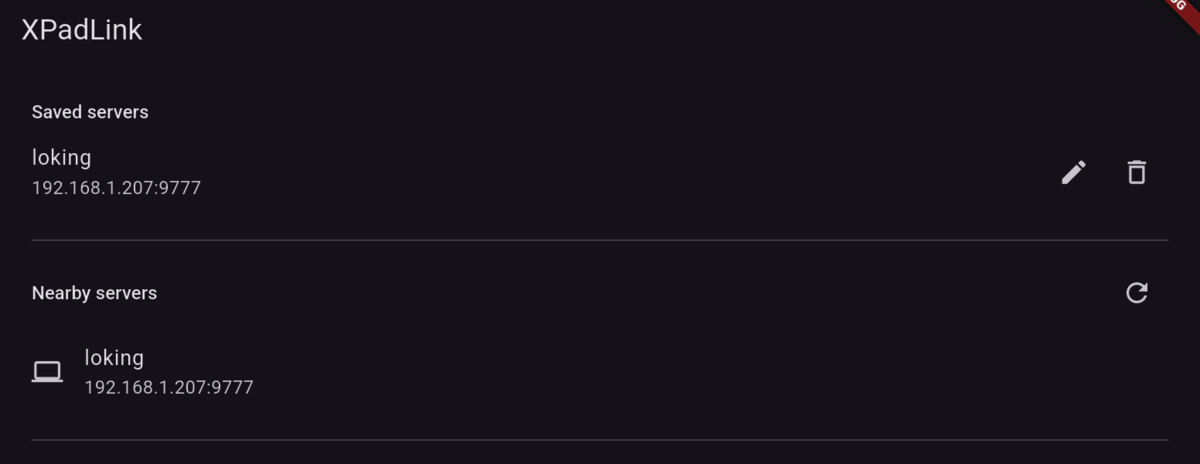
Saved servers on top, nearby servers found by broadcast below.
Tap the server, and the touch controller appears. Sticks, D-pad, ABXY, bumpers, triggers, and L3 and R3 for the stick clicks.
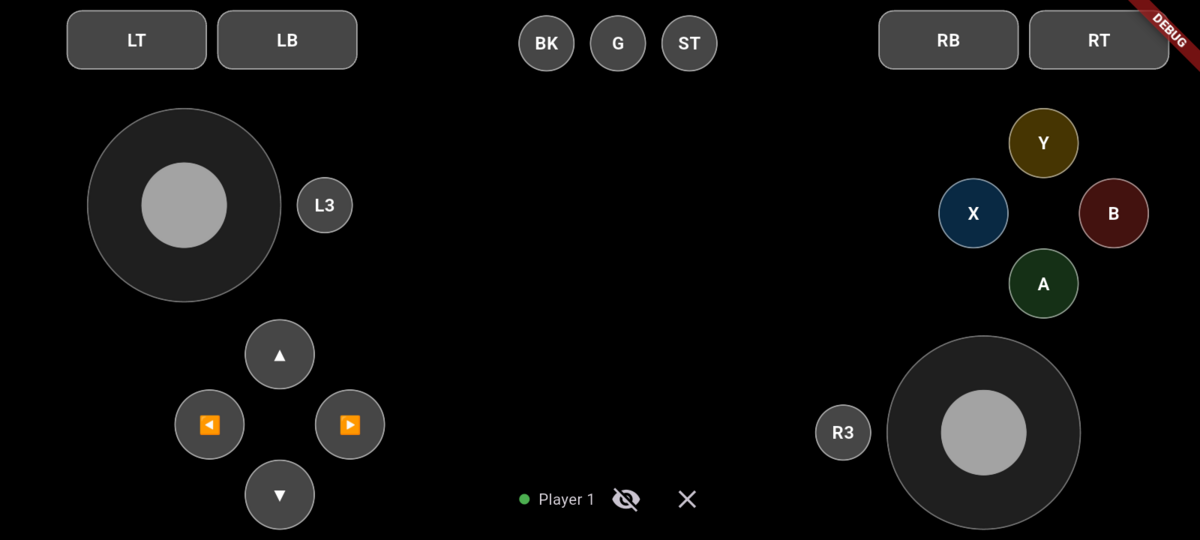
The touch layout. Plug a controller in and it hides itself.
On the PC, the server logs the join:
level=INFO msg="client joined" from=[::ffff:192.168.1.2]:35680 player=1 name=LokingUle
And the kernel sees a new gamepad:
N: Name="XPadLink - Xbox Controller 1 (LokingUle)"
The browser sees it too. This is hardwaretester.com/gamepad with the left stick pushed from the phone:
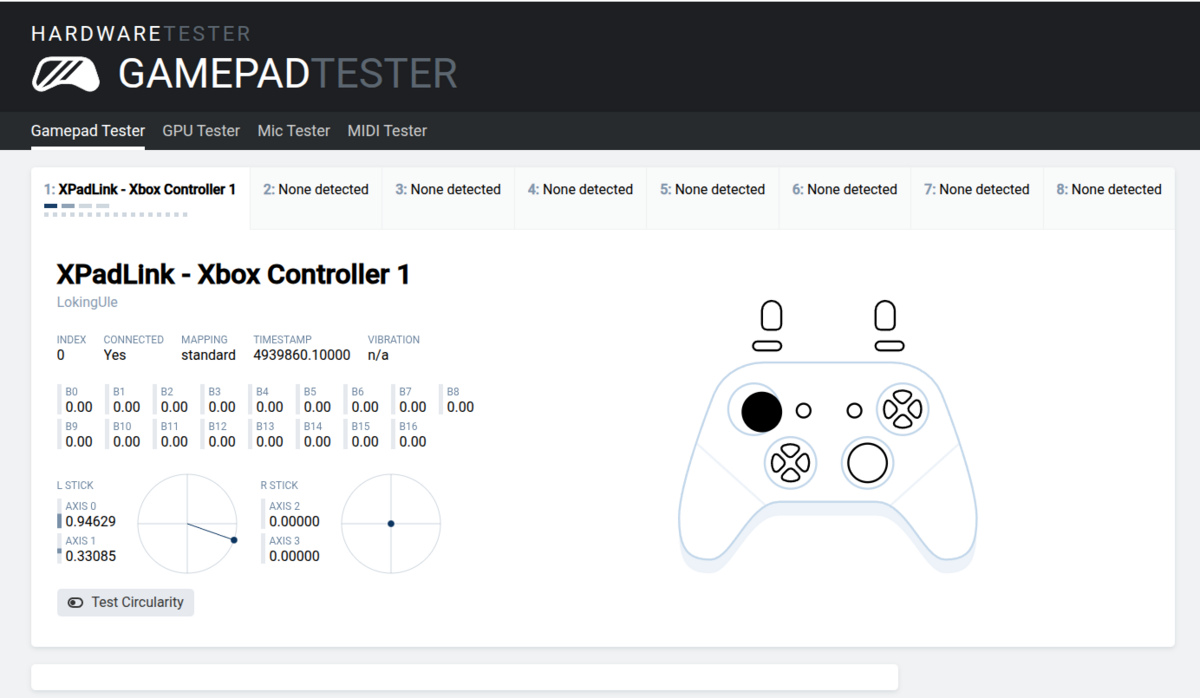
Connected, standard mapping, and the left stick follows my thumb on the phone.
Into Cemu
Same steps as before: Options, Input settings, SDLController, pick the pad from the dropdown, Auto-assign.
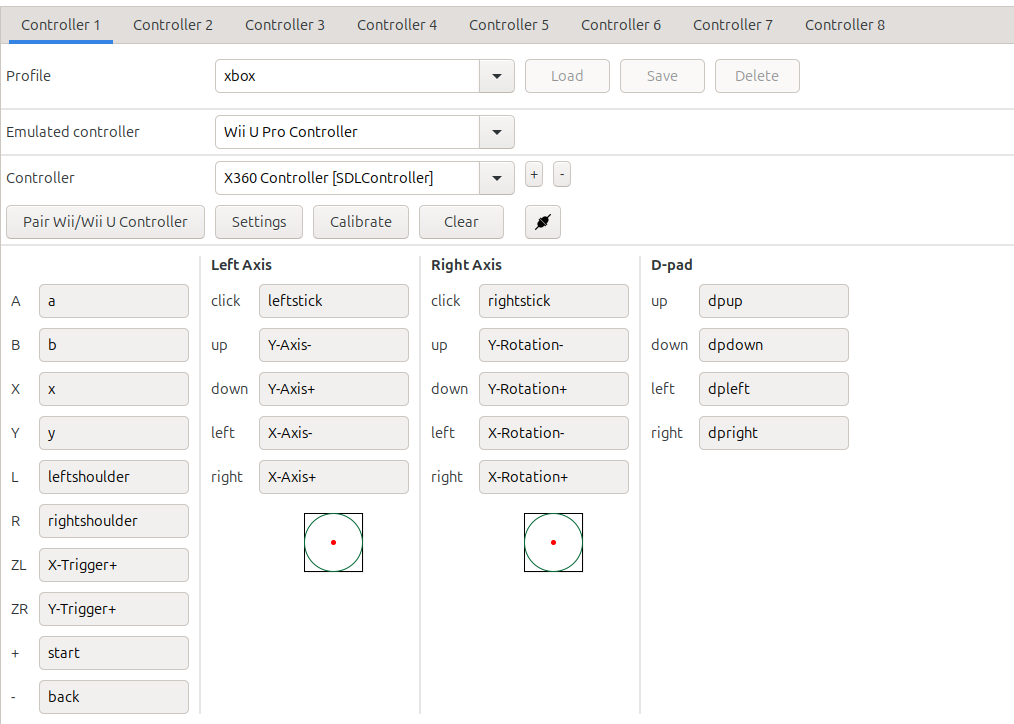
Auto-assign mapped everything: sticks, D-pad, shoulders, ZL and ZR.
No manual mapping, no profile tweaking. It just looks like an Xbox pad.
Vibration, from the game to my hand
A game asks the pad to rumble, and the phone buzzes. Getting there takes a few steps.
The virtual pad advertises force feedback, so the kernel passes the game’s rumble requests to xpadlinkd. The daemon answers the kernel’s upload and play requests, then sends a small rumble packet over UDP: a strong motor, a weak motor, and a duration. The app turns that into a vibration on the phone, or on the controller if it has motors.
I tested the server half without a phone first, with a tiny tool that plays an effect on the virtual pad the way a game would. The log showed strong=50000 weak=20000 ms=600. Then I played in Cemu, and the phone buzzed. It’s about 150 lines of Go.
The bugs that taught me something
The GameSir that wasn’t there. I pressed buttons on the GameSir and nothing happened in the app. The logs showed no gamepad at all, only the touchscreen and the headset jack. The reason was silly: my phone has one USB-C port, and adb was using it. The GameSir X2 plugs into that same port.
I switched adb to Wi-Fi (adb tcpip 5555), plugged the pad in, and the log lit up:
input device first event id=29 name='GAMESIR Gamesir-X2 Type-C' vendor=1452 product=15110 pad=true axes=[HAT_Y,BRAKE,GAS,Z,Y,HAT_X,RZ,X]
physical pad active: GAMESIR Gamesir-X2 Type-C
No code change. Just a cable.
Two players, one phone. I was suddenly “player 2”. Something else held slot 1. I looked at the UDP sockets on the phone and found a port owned by a different app: the first build of XPadLink, from before I renamed it, still running in the background. I uninstalled it and the pad dropped out on timeout.
The silent wrong token. Type the wrong token and the app just said “Connecting…” forever. The server was ignoring me, politely. Now it answers with a reject packet and the app says Wrong token in red.
macOS CI crash. The GitHub Actions build failed on macOS with missing LC_UUID load command. Go 1.22 test binaries don’t start on current macOS. I pinned CI to Go 1.24.
Cemu’s pad name. I named the virtual pad XPadLink - Xbox Controller 1. The browser shows that name, but Cemu shows X360 Controller. SDL swaps in its own label for the Xbox 360 vendor and product pair. That’s the price of needing no mapping, and it’s only a problem if you plug in a second Xbox pad and need to tell them apart.
The gyro that wasn’t there. The Breath of the Wild maze shrines need the Wii U GamePad’s tilt. Cemu reads motion from a small UDP service called DSU, so I built one into the daemon and sent the phone’s gyro to it. Then the app log said motion unavailable: gyro=false. My phone has an accelerometer, a magnetometer and a rotation vector, and no gyroscope at all.
So I derive the turn rate from the rotation vector: the change between two readings, divided by the time between them. The numbers flow, Cemu subscribes, and the maze reacts. But it still flips upside down in the shrine, and I haven’t found why. I’m calling motion experimental, and a phone with a real gyro might behave better.
The upside-down screen. Android said the phone was in landscape with the top on the left. I was holding it the other way, so the display was upside down, and my tilt code was off by 180 degrees. The system just didn’t follow the sensor. I added a flip button to the app. The motion code reads the screen rotation too, so one tap fixes both.
Logs, because Wi-Fi isn’t perfect
My Wi-Fi isn’t super stable. It wasn’t with Moonlight either. So the app logs a summary every 5 seconds:
link: connected=true hello=5 state=94 ack=4 sendFail=0 maxAckGap=2114ms (5 s)
Now I can see it: mostly 1 second gaps between acks, which is normal, and the odd 2 second one when a packet gets lost. Guessing is gone.
The server uses structured logs too, so journalctl tells the same story from the other side.
Run it as a service
I didn’t want to start the daemon by hand. XPadLink can install itself:
xpadlinkd install
On Linux that’s a systemd user unit. It starts at login, and the token is saved once so the phone never needs a new one. I killed it with kill -9 to check, and systemd brought it back.
journalctl --user -u xpadlinkd -f
xpadlinkd uninstall
macOS (launchd) and Windows (a scheduled task) are in there too.
Try it
The server is a single binary. Grab it from the releases page, then:
make uinput-setup   # one time: udev rule + input group, then log out and in
xpadlinkd install   # start it in the background
The app is xpadlink.apk on the same page. To build it yourself you need the Flutter SDK:
make app && make app-run
The code is at github.com/josuebrunel/xpadlink.
Where it stands
What works:
- Phone touch controls and a GameSir pad plugged into the phone.
- Vibration: a game’s rumble buzzes the phone.
- Automatic server discovery, saved servers, up to 4 phones at once.
- Linux daemon as a service, with release binaries for Linux, macOS and Windows.
What doesn’t (yet):
- Only Linux can create the virtual pad. The macOS and Windows builds compile but I haven’t tried them on real machines.
- Gyro is experimental. It reaches Cemu, but the Breath of the Wild maze shrine still flips. My phone has no gyroscope, so the turn rate is derived and noisy.
- LAN only, no encryption. The token just keeps strangers on your Wi-Fi from sending input.
- Bluetooth controllers should work like the GameSir does, but I haven’t tested one.
Sunshine and Moonlight are uninstalled. XPadLink is the new sheriff in town.
The bigger point isn’t the gamepad. It’s that when no app fits your need, you can now build the one that does.